Marketo Critical System Maintenance Alert (Feb 14, 2026)

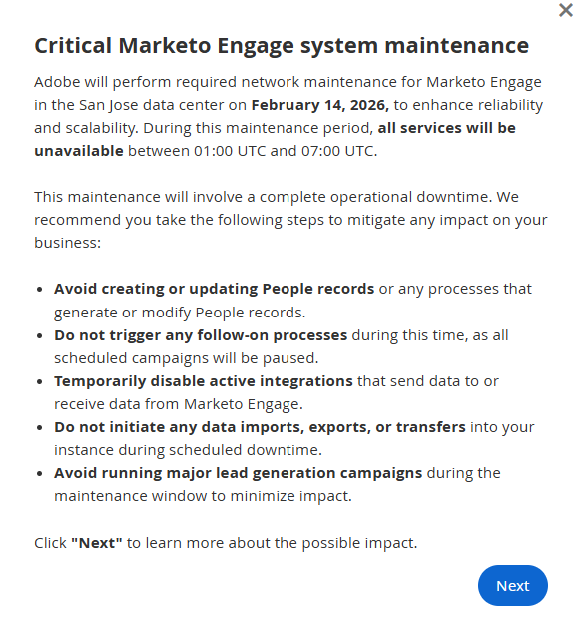
Adobe is planning critical system maintenance on February 14th.

On February 14th, from 1:00 UTC to 7:00 UTC, all services will be unavailable.

This will affect all those who have their Marketo instance on the San Jose data server.

Here are instructions on how to mitigate any impact on your business:

  • Avoid creating or updating People records or any processes that generate or modify People records.
  • Do not trigger any follow-on processes during this time, as all scheduled campaigns will be paused.
  • Temporarily disable active integrations that send data to or receive data from Marketo Engage.
  • Do not initiate any data imports, exports, or transfers into your instance during scheduled downtime.
  • Avoid running major lead generation campaigns during the maintenance window to minimize impact.

Note: This info came straight from an official Adobe post ⬇️

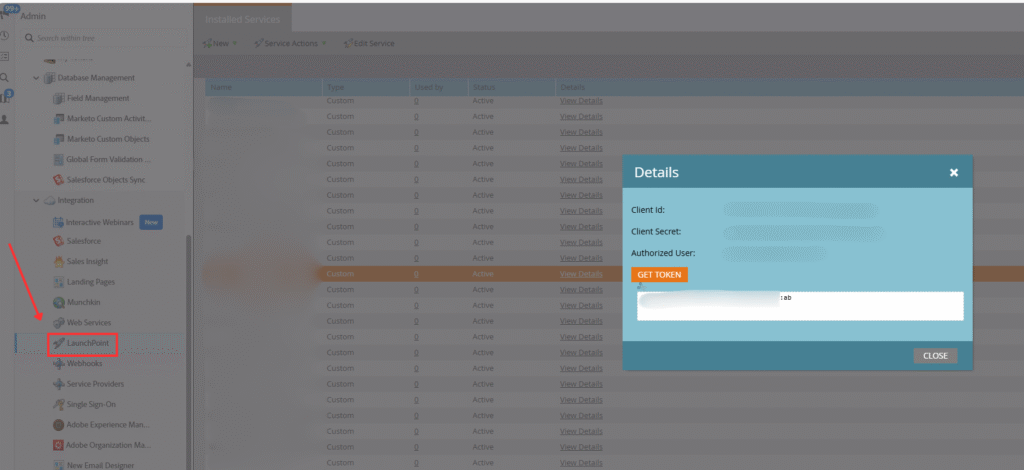
If you’re not sure whether or not your Marketo instance is on the San Jose server, here’s how to check:

1. Navigate to Admin -> LaunchPoint


2. Select any service -> click “View Details”


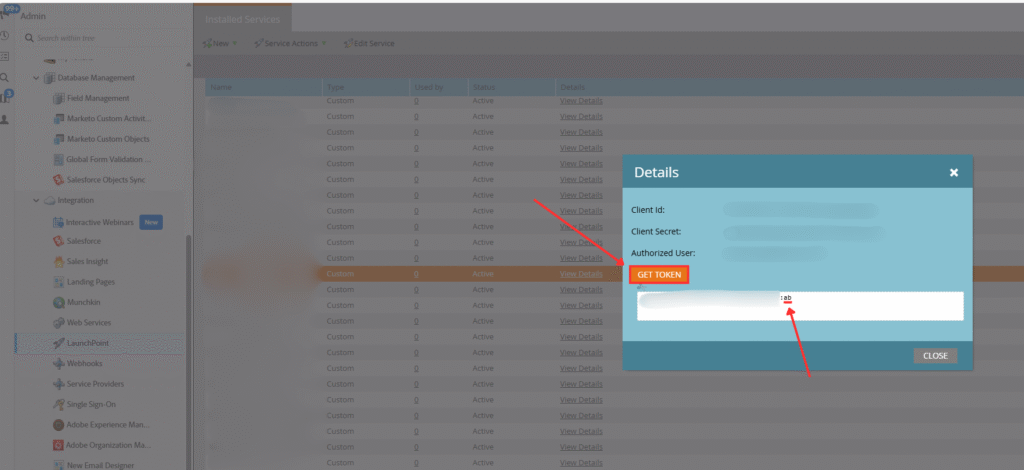
3. Click the “GET TOKEN” button. Look at the two-letter abbreviation after the “:” in the token.

We have “:ab” in the screenshot below. 

But if you have “:sj”, you’re on the San Jose server and will be affected by this system maintenance.

If you have any questions or concerns regarding this Marketo system maintenance, feel free to reach out to us here.

AI in Marketing Ops: What’s Actually Happening in 2026

When it comes to AI, there’s a lot of noise out there. 

Constant big announcements from major companies, new tools and updates every month, sweeping predictions about the next 5 or 10 years…

But if you’re in Marketing Ops, you’re not thinking 10 years out. You’re probably thinking about this quarter, this year, and what you should realistically be preparing for.

That’s the lens we wanted to take here. We asked our leadership team to share what MOPs professionals should be paying attention to in 2026. 

Not abstract trends, but practical shifts: what’s changing, what needs to be in place, and where the pitfalls are.

Many of their ideas overlapped, so rather than present four separate viewpoints, we’ve combined their takes into one cohesive picture. 

Let’s get into it!

AI Agents Are Getting Real

AI agents have been a hot topic in the marketing world (and the entire world) since late last year, but 2026 is the year they actually start delivering value inside companies. Especially towards the second half of this year.

We’re moving past the experimentation phase, where individual teams played with isolated tools. The shift now is from solo agents to orchestrated systems. Think of it as going from a solo musician to a full orchestra playing together.

What does that look like in practice? 

Imagine one agent monitoring your CRM for missing or incorrect data. Then, a second agent picks up those flags and enriches or corrects records. A third updates scoring and routing. A fourth analyzes engagement and recommends next best actions. All running quietly in the background with minimal human involvement. 

Eventually, this will led agent-to-agent interactions on both sides of the conversation. For example, when your AI emails a lead, it might not be a human reading it. It could be the lead’s AI agent reading, prioritizing, and summarizing it for them. This will fundamentally change how we think about content strategy and communication.

You Need to Build the Foundation

The uncomfortable truth is that the biggest shift in 2026 isn’t AI itself; it’s building the data foundation that makes AI actually work.

Too many GTM teams have been moving fast on top of weak data. Their foundation is full of Inconsistent account data, messy lead sources, duplicates everywhere, and half-manual lifecycle models. AI can’t fix this for you. It will simply automate the chaos.

The mindset shift required to combat seems counterintuitive at first: We need to slow down to speed up. 

This means standardizing fields, aligning definitions, fixing routing rules, and cleaning up years of messy inputs. With strong, clean data in place, AI can accelerate teams in meaningful ways. This is what separates high-performing GTM teams from everyone else.

It’s also important to remember that data also can’t stay siloed. For so many teams, data is currently managed as “marketing data”, “sales data”, or “customer data,” but it’s the same person moving through your funnel. Those silos create discrepancies that break AI and hurt downstream results. Data governance needs to become an organizational function, not a departmental one.

And governance extends to AI itself. “Human in the loop” isn’t a sufficient guardrail anymore. When AI is scoring leads or generating personalized emails at scale, we can’t assume that anyone will be reviewing every single output. Instead, MOPs teams will need to build real systemic guardrails to ensure quality and brand alignment.

To reach the orchestrated AI future we’re talking about, you need a robust architecture supporting it. CRM, MAP, CDP, and product systems connected together, with AI agents layered on top. And none of this works if teams are working in silos instead of collaborating.

What This Means for Platforms & Teams

We expect AI adoption to centralize into pre-approved platforms. 

It’s similar to what happened years ago with websites. Marketing got tired of waiting weeks for IT to make changes, so hosted landing pages emerged. Now, tools like HubSpot, Marketo, and Salesforce that are already approved can slip past InfoSec and let teams implement AI features without the overhead.

The tradeoff is that decentralized experimentation tends to produce better results. So this centralization may lead to some disappointment. Instead of finely tailored agents, teams may end up with limited out-of-the-box features.

As for headcount, we don’t believe the hype that AI will replace your team. We’re not at a stage where AI can fully replace staff. The real gains are coming from AI acceleration with the right team. We view AI (and AI Agents) as a wingman, not a full-on replacement. 

In fact, companies that already cut teams may start hiring again, because automation often creates scale that requires more capacity to service. So we expect hiring and team expansion in strategic areas.

That said, if you’re in the market for a new role, being “AI-activated” is now career-critical. You need to know how to work with AI, build AI into your workflows, and manage AI within your systems. If you don’t, job insecurity becomes more and more real.

The New Trap to Avoid

We want to end things with a brief note about metrics.

Remember when vanity metrics were things like website visits and email open rates? If they didn’t convert to revenue, they didn’t matter.

Well, AI is creating a whole new generation of vanity metrics. 

Statements like, “We handled X conversations with our chat agent,” sound impressive at face value. But if there’s no conversion and no revenue at the end, you’re just paying for a tool that talks to people without actually driving results.

Dig deeper into these flashy metrics and get to the bottom of how (and if) they represent value in a meaningful way.

If you want to learn more about how your team can drive real results with AI in Marketing Ops, book a free 30-min call with one of our senior consultants here.

The (Non-AI) Trends Marketers Should Focus on in 2026

While staying on top of AI trends is definitely important, there are many other things that will shape how marketers operate this year.

We have a piece that is entirely focused on AI in Marketing Ops in 2026 here. But in this article, we’re going to put all things AI aside.

Some of the most meaningful shifts happening right now are about fundamentals: how we define our audience, what we measure, how teams work together, and whether we’re operating proactively or reactively.

Here’s what our leadership team thinks marketers should be paying attention to in 2026. 

The B2B Lead is Dying. Buying Groups Are Taking Over.

The truth is, B2B purchases aren’t made by individual leads. They’re made by buying groups (a collection of people who decide together on what the best solution is). And while we’ve been moving toward account-centric models for well over a decade now, our systems are still person-focused. 

Our processes and metrics are still lead-focused, at least at the beginning. Account-level orchestration and buying group workflows exist, but they’re duct-taped together manually because the underlying systems weren’t built for it.

But that’s starting to change. We now have the data and analytics capabilities to actually investigate buying groups, and this will have a huge impact on how we run our processes.

Going forward into 2026, marketers should think about what this shift means in practice. Ask yourself questions like:

  • Does lead scoring even make sense anymore? 
  • Should we be thinking about buying group scoring instead? 
  • How do buying groups move across our lifecycle? How do we evaluate the completeness of a buying group? 
  • And what does the process look like when it’s time for a handover from marketing to sales?

If a buying group has ten people from a company, you can’t attribute the “MQL moment” to a single person’s most recent interaction. You’ll have to create ways for BDRs to understand what the buying group is interested in, what all recent interactions were, and who the warmest contacts are within that group. 

The language we use will eventually start to follow the reality. Stages like “MQL” may come out of the funnel entirely, replaced by something more account-level and business-ready.

Vanity Metrics Are Out. Revenue is the Only KPI That Matters.

There’s been a tendency for teams to micro-analyze everything. But the core metric needs to be simpler: revenue, and what’s driving revenue. Everything else should feed into that. 

While traditional funnel metrics like lead-to-MQL conversion rates are useful, in a world where the funnel shape is changing, it makes more sense to figure out what avenues are truly driving revenue and measure those instead. 

For example, metrics like website visits, open rates, and click rates can look impressive on a report, but if none of that is transitioning to revenue, they’re not telling you much.

The same applies to how organizations operate. 

Reactive marketing teams tend to optimize for outputs like leads, clicks, MQLs, etc. But those are lagging indicators. They aren’t direct proof that what you’re doing is working.

Stop Reacting. Start Articulating Intent.

A lot of companies have been operating out of a “reactive model” for marketing and data. If you think you may be doing this, a simple tell is when someone asks “why” you did something, you have to pull a report to give them the answer.

For example, when asked, “Why did that lead get prioritized?”, you answer that the model scored it that way. Or “Why did we run this campaign?”, your answer is because it worked last quarter. 

These are responses to signals, but they don’t articulate clear intent.

Reactive teams discover the meaning of things after the fact. They let tools define their priorities, instead of defining priorities themselves and picking tools that align. And they treat dashboards as explanations, not evidence. 

In 2026, expectations will be that teams can articulate intent, not just respond to what happened.

Desilo Data.

We covered this in our AI trends article, but it’s worth repeating here because it’s not just an AI issue. 

Data lives in silos. Marketing, sales, and customer success all manage their own version of it, even though it’s the same person moving through the funnel. That fragmentation creates inconsistencies and gaps that compound over time.

Before adding new technology, teams need to rebuild trust in their data. This means standardizing fields, fixing routing rules, and cleaning up years of messy inputs. Going back to identify the sources of those messy inputs will be key to transforming your business.

And while high-quality, desilod data certainly isn’t a new concept, it continues to be a central focus for marketing teams in 2026.

Reach out to us here if you want to get more from your marketing investment in 2026 (free 30-min call with one of our consultants).

What CMOs Really Want From Marking Ops in 2026

2026 is right around the corner!

For Marketing Operations pros, having a solid plan that’s ready to go makes all the difference when the year kicks off.

But the challenge isn’t just building a solid plan; it’s building one that resonates with the priorities your CMO and leadership team actually care about.

So what should MOPs folks focus on when planning for the year ahead? Here’s what leadership will want to see at a high level.

1. Predictable Pipeline

Pipeline uncertainty is one of the biggest concerns for your leadership team. Most companies struggle with foundational questions around their buying personas, purchase timing, and the length of the buying process. And when these fundamentals aren’t nailed down, forecasting becomes guesswork.

When you have the right measurement structure in place (tracking everything from lead creation to MQL to opportunity to won), you can backtrack through your conversion rates by channel to determine exactly what’s needed to meet targets.

For example, if your MQL-to-opportunity conversion rate is approximately 10%, you need about 1,000 MQLs to close 100 deals. Similarly, if your lead-to-MQL conversion rate is approximately 25%, that means you need about 25,000 new leads to get there. This kind of structured thinking with tangible metrics is exactly what resonates with leadership. Your plan should include a process for improving (or implementing) this type of tracking throughout your entire funnel.


2. Attribution Clarity

Achieving a predictable pipeline is only possible when you know where your wins are actually coming from.

Attribution is a deep topic with complex models (we won’t go into that here), but at a high level, attribution clarity means understanding which channels generate your best net-new leads, which ones convert to MQLs and opportunities, and where your marketing dollars are working hardest.

The value becomes clear when you compare channels. If you’re spending the same amount on two different ad platforms but one generates ten times more opportunities, the budget decision becomes straightforward.

Attribution clarity removes the guesswork from allocation decisions, and that’s something every C-suite appreciates.


3. AI Governance

AI is on every executive’s radar right now, and governance has become a major concern.

AI governance is complex. But at its core, it’s about ensuring your organization uses AI safely, ethically, legally, and effectively, while staying in control of risks and outcomes. It is crucial to boost customer trust, prevent legal violations, keep your business audit-ready, and reduce the risk of operational chaos.

Many organizations are finding that security and governance reviews for AI tools take weeks or even months to complete (this is completely natural and expected, given how new this space is).

But this also presents an opportunity: MOPs professionals who proactively address AI governance in 2026 plans with have a head start and will definitely stand out. AI implementation the right way, with an emphasis not only on productivity gains but proper security, safety, and privacy, is key.


4. Efficiency Gains and Automation ROI

Every budget request eventually comes down to ROI. If you’re asking leadership for $50,000 for a new tool, for example, their response will likely be primarily focused on how you’ll make that money back. Leadership will normally have no problem spending budget if the ROI is clearly demonstrated in a robust plan of action.

So, as a MOPs team, efficiency gains and automation initiatives need to be framed in terms of return on investment. When you tie your initiatives directly to revenue impact, you make it easier for leadership to say yes.


5. Data Quality Enabling GTM Strategies

We’ve said this many times before, but it’s more important now than ever:

Clean data is the foundation of everything else on this list.

Without it, pipelines become unpredictable, attribution models become unreliable, and your go-to-market strategies are built on shaky ground.

For example: If you mislabel the source of your leads, your main MQL-driving channel is incorrectly tagged. This means you’ll end up investing in the wrong place, wondering why results aren’t materializing. Data quality isn’t a technical nice-to-have; it’s a strategic necessity.


6. MOPs as Risk Management Insurance

Frame your MOPs team as the CMO’s “risk management insurance”.

What do we mean by that?

CMOs focus on pipeline, performance, and strategy. The only reason any of that moves is because MOPs keeps the engine stable, connected, and compliant on a daily basis.

We are the people who prevent the silent failures: broken integrations, bad data flows, sync delays, deliverability issues, API limits, rogue automations, and privacy violations that can ruin a quarter before anyone even sees the warning signs.

And risk management is not only technical. MOPs protects the brand by making sure emails land in the inbox, consent and regional privacy rules are respected, and every system behaves predictably.

Without this foundation, campaigns fail, reporting collapses, and the business loses credibility.

MOPs is the safety net and the operational guardrail that keeps marketing performing and keeps the company out of trouble.

If you frame your 2026 initiatives around these six areas, you’ll have a plan that speaks directly to what leadership cares about.

That connection between your work and executive priorities is what makes the difference when budget conversations come around.

If you need help putting together your plan or reaching your MOPs goals for the year ahead, reach out to us. We’d love to chat!

Where Does AI Fit Into Your 2026 Budget?

If you’re currently planning your 2026 budget, AI is probably somewhere on the list.

And if it’s not, it should be. This past year has shown us that AI tools are more accessible than ever, use cases are clearer, and implementations are delivering measurable results.

The organizations planning for it now will be further along, while others will still be figuring out where to start.

But where exactly does AI fit into next year’s budget, and how do you make a case for it to leadership?

These are the questions we’ll be answering in today’s article. Let’s get into it.

One thing we want to make clear from the get-go is that AI budgeting isn’t about building a roadmap. It’s about identifying specific use cases, understanding the infrastructure they require, and being clear about both the costs and the gains.

  1. Know Where You Stand

If you’re not sure where your organization currently stands in regards to AI usage and implementation, start with our AI Assessment Tool.

After completing a short questionnaire, the tool will automatically generate a personalized report that details:

  • Where your company currently stands regarding AI adoption readiness
  • A customized roadmap your company can follow for successful AI integration.

Once you have that baseline, the rest of this guide will help you think through how to move forward.

  1. Identify Use Cases & Frame Them Around Gains

This is where you get specific. Using the AI Assessment report as a guide, look for AI use case opportunities that fall into two categories:

  • Operational efficiency: Workflow acceleration, automated processes, fewer hours spent on repetitive tasks, etc.
  • Customer experience: Improved marketing that drives more revenue, in the form of smarter personalization, faster response times, improved engagement, etc.

And don’t try to solve everything at once. Pick one or two high-impact opportunities where AI can make a measurable difference, then expand later as needed.

Once you have your use cases, leadership needs to understand the value. Before you talk cost, focus on tangible outcomes. Leadership approves AI projects when they see clear gains. Know which category of “gains” your use case falls into and frame your ask accordingly. The clearer you are about the outcome, the easier it is for leadership to say yes.

  1. Understand the Real Costs

We see AI costs are often underestimated. A single-user subscription to something like ChatGPT Enterprise might run $25/month, but that doesn’t enable robust automation. Automation requires tokens, and tokens come with an entirely different pricing structure. Each major LLM handles this a bit differently, but most of them will provide a rate per 1 million tokens. Whether you’re using OpenAI, Claude, Gemini, etc., check the rates that apply to you.

Aside from usage rates, there are other important factors to consider:

  • Implementation costs: Whether you build internally or work with a partner company, implementation takes time and money. If you pull internal resources, those team members won’t be doing their normal jobs while they build AI workflows (and if you’re working with an agency or consultant, factor that into your budget from the start).

  • Adjustment period: New processes cause temporary productivity dips you should plan for when building a timeline. If you implement a new workflow in June, don’t expect to see full gains until at least a few weeks later. We recently published an article centered around preparing your team (and tools) for AI that can help with this.

  1. Choose the Right Type of Solution

It’s important to remember that not all AI solutions are created equal. The type of solution you choose has real implications for cost, flexibility, and long-term viability. The nature of your AI use case opportunities (that you identified in tip #2 above) will guide which solution type is necessary. We’ll break these solutions into 2 categories as well:

  • Point solutions are products that do one specific AI-powered thing. They’re faster to deploy and often cheaper upfront. But customization is pretty limited, and you may outgrow the tool as your requirements evolve. These align with Levels 1-2 of the adoption framework from our AI Assessment tool: where individuals or teams are using AI tools but without deep integration into their processes.

  • Custom implementations are built specifically for your stack and workflows. They’re more flexible and tailored to your environment. But they require more investment upfront, a longer implementation timeline, and ongoing maintenance. These represent Levels 3-4 in the adoption framework: where AI is embedded into your operations with custom integrations designed for your specific needs.

There are some solutions that sit in the middle of these two categories. Our AI teammate for Marketing Ops, Otto, is built on a structured foundation, but it’s assembled bespoke for each client’s unique tech stack and business needs. It knows how to behave inside your unique platform, which steps to take, and what the limitations of certain API calls are.

As we head into 2026 at full speed, it’s important to think strategically about where AI fits into your operations and how that is reflected in your budget. Use our AI assessment tool to get you started, and follow these tips to build a framework that makes sense for your organization (and leadership team).

If you’re still not sure where to begin or want to talk through what this might look like for your specific situation, we’re here to help.

This is exactly the kind of conversation that’s worth ASAP,  rather than six months from now when you’re stuck playing catch-up.

How to Prepare Your Tools and Team for AI Agents

Our last article covered how marketers can build their own Marketing Ops assistant using MCP (an invaluable skill that will give you a head start going into 2026).

But building your own MCP is only half the battle.

In order to fully utilize AI agents and assistants, your systems and team members must actually be ready for them.

What do we mean by that?

Think about hiring someone new to join your team. It will likely take at least a few weeks for them to work effectively in your systems. AI tools are no different. They’re trained on general knowledge, but they have never seen your specific, unique setup. They need documentation and training data to make a real difference.

And your team members must be prepared as well. Specific processes will completely change. Time will be freed up and reallocated in different areas. And certain roles will benefit immediately from your AI agents, while other roles may not notice the initial impact. Expectations need to be calibrated from the get-go.

If this all seems like a lot, don’t worry.

We’ll walk you through both sides: getting your systems ready for AI, and getting your team ready for the shift.

What we're covering in this article:

Preparing Your Systems

Let’s start with the basics. These best practices are going to be essential in order for your AI agents to navigate your system effectively. Let’s run through them.

  • Naming Conventions: AI agents read program names, folder names, and asset names to understand context. If you have programs named “Test_v3_Final_REALLY_FINAL,” the AI won’t know what to do with them.
  • Templatization: Create consistent templates for each program type. AI agents need patterns to identify and follow.
  • Tokenization: The more you use tokens instead of hard-coded values, the more an AI agent can help you. Tokens are variable placeholders that AI can understand and manipulate.
  • Data Hygiene: Clean up duplicates, standardize values, and maintain field integrity. AI agents will perpetuate bad data if that’s what they find.
  • Clear Descriptions: Use description fields everywhere. On programs, smart campaigns, and assets. AI agents can read these much faster than humans can, and they provide critical context.

It’s also very important to make it crystal clear when something is legacy content.

You can achieve this by doing things like:

  • Create an “Archive” or “Legacy” folder
  • Add “Z_” to the beginning of old program names
  • Use description fields to mark deprecated templates

If you don’t clearly mark legacy content, your AI agents might start using outdated templates or get trapped following obsolete processes.

Creating Solid Documentation

With those best practices in place, let’s move on to documentation. This is going to be your AI agent’s training manual. This is a crucial step that will help your agents learn your unique system (just as you would train any new teammate coming on board).

#1 Process Steps

Explain each process as clearly as possible, step-by-step. Remember: You’ve probably looked at countless marketing automation instances in your career, and none of them follow the exact same process. They all have peculiarities that AI agents won’t magically understand. Specific documentation fixes this.

#2 Unspoken Rules

These are the “tribal knowledge” items that exist in our heads as a result of our experience and interactions with other folks at your company or in the industry. They are important rules, but ones that AI will never be able to intuit. Be sure to document as many of these as you can.

These could cover a wide array of things, for example:

  • “We always clone that one program from 2014 for this specific use case”.
  • “For partner webinars, use the Partner template, not the standard template”.
  • “If the campaign name contains ‘Exec’, it goes in the Executive Events folder”.
  • “We never use the green email template because it has formatting issues”.

#3 Make it AI-Friendly

AI models struggle with negative instructions. Meaning, instead of “Do not do X”, write it as “Instead of X, do Y”.

Here’s a real-world example to illustrate this further.

Bad: “Do not use the blue template for executive events”. Good: “For executive events, use the gold template instead of the blue template”.

And make sure you use explicit instructions when dealing with AI. Be specific about what should happen, not just what shouldn’t. The more explicit you are, the less room for erroneous interpretation there is.

#4 Get Video Transcriptions

A lot of internal documentation exists as videos or recorded training sessions. AI agents can’t watch videos (yet), but they can definitely process transcripts and screenshots.

Go through your resources and transcribe training videos (several AI services can do this for you. We like Descript), extract key screenshots, and convert visual walkthroughs to written steps.

#5 Document API Steps

Now we’re getting into some more advanced stuff, but it’s incredibly helpful for AI agents to have. Go ahead and document the specific API calls needed for each of your processes.

For example, this may look something like:

To update program tokens:

  1. POST to /rest/asset/v1/program/{id}/token.json
  2. Required parameters:
    • name: token name
    • value: new value
    • type: text/rich text/score/date
  3. Authentication: Bearer token in header
  4. Expected response: 200 OK with updated token details

AI training becomes much easier (and far more effective) when you have this level of documentation to feed it.

Preparing Your Team
(and Yourself)

We alluded to this in the intro: it’s really important for you and your team to calibrate expectations and prepare for what the introduction of AI agents actually means for both day-to-day work and long-term progress. Here are some important points that will get everyone aligned.

#1 Adjust Expectations

There’s a lot of hype out there surrounding what AI can do. And while AI can have a massive positive impact on productivity, it won’t happen instantly. Many think that as soon as AI agents are turned on, they will start building all your campaigns the very next day.

The reality is, every new technology requires process redesign and learning. In fact, productivity will likely decrease during this adjustment period before it increases.

Why is that? When you implement AI agents, several things start happening:

  • Your team needs to learn new workflows
  • You’ll discover edge cases and limitations
  • Processes need adjustment (for example, humans still need to update smart campaigns in Marketo)
  • There’s a learning curve in knowing when to use AI vs. doing it manually (very important)

This is all normal. Give your team a week or two to adapt, and set expectations with your managers and stakeholders about this adjustment period.

#2 Understand the Impact by Seniority

It’s also worth noting that AI productivity gains are not evenly distributed. Due to the nature of the tasks that AI is currently most adept at, the impact will vary by role. We can break this down into a few buckets based on seniority.

  • Junior Employees: Experience the highest productivity increase. AI agents help with basic tasks they’re still learning, allowing them to work faster and with more confidence.
  • Senior Employees: Experience lower (but still positive) productivity increase. They already know how to do things efficiently, so AI is more of an enhancement than a total transformation.

#3 Choose Your Collaboration Model

Now, let’s quickly go through the two main models we can use to define our human-AI collaboration system. These will help us structure our processes and specify where productivity gains can actually happen. We first heard about these models from author and Wharton School professor, Ethan Mollick, when he wrote about the models (and a concept called “The Jagged Frontier” which we’ll touch on shortly) in an article here.

The Centaur Model

This is named after the mythical creature that’s half human and half horse. The Centaur model defines clear boundaries between:

  • What you do
  • What AI does

And we never cross into each other’s territory.

For example: AI clones the program and updates tokens → Human reviews, updates smart campaigns, and does QA. There are clear handoff points.

This model is best for structured processes with clear steps that can be divided between human and AI capabilities.

The Cyborg Model

Conversely, like a cyborg that seamlessly blends human and machine, this model has no clear boundaries. You’re constantly experimenting with things like:

  • What can be handed off to AI?
  • Should I write this specific code or ask AI to write it?
  • Now that AI wrote it, should I refine it?

For example: You ask AI to write data analysis code, but you review and rewrite the statistics portions because you know AI can mess up statistical calculations.

This model is best for creative work, complex analysis, and scenarios where you’re still discovering the capabilities of your AI agents.

These models are more of a guide than a strict process. Most will gravitate more towards one or the other, depending on how they’re using AI. There’s no right answer. Try each for different scenarios and see what works best for you.

Two Critical Traps to Avoid

With all of that in mind, we want to leave you with two significant pitfalls to watch out for as your team adopts AI agents.

Trap 1: The Jagged Frontier

As we know by now, AI intelligence works completely differently from human intelligence. It can do certain complex tasks with incredibly impressive speed, but then fail something as simple as counting the “R’s” in “Strawberry”.

This inconsistency in AI capabilities is known as the “Jagged Frontier”, which we first heard from Ethan Mollick.

Think of AI capabilities as uneven, inconsistent, and “jagged”, where it excels at complex tasks but struggles with some simple ones.

Why does this matter? We have to challenge our assumptions about what AI actually can or can’t do. We may think that a simple task is easily achievable by AI, but then it struggles. And when we try to use our agents for tasks they can’t handle, productivity will inevitably tank. You could run into hallucinations, errors, broken campaigns, and so on.

To overcome this, we need to:

  • Continuously map the jagged frontier: Keep testing what AI can and can’t do
  • Don’t assume: Task difficulty for humans ≠ task difficulty for AI
  • Share learnings: When you discover a capability or limitation, document it for your team
  • Fail safely: Test AI outputs in non-critical scenarios first

You can read Ethan’s blog on this here, as well as the full study here. 

Trap 2: Automation Bias

This second trap is perhaps the more dangerous one. And we have a fascinating real-world example that illustrates how it works (known as the Paris subway story).

In short, Paris introduced semi-automated subway lines that were partially controlled by AI and partially by humans. The results were:

  • Fully automated lines: Very few accidents
  • Human-operated lines: Very few accidents
  • Semi-automated lines: Significantly MORE accidents

Why were the semi-automated lines seeing more accidents? Because when humans see a machine doing something right 99% of the time, they stop paying attention. They assume it will be right 100% of the time. So when that 1% error occurs, humans aren’t ready to catch it.

In other words, we’re generally pretty bad at being “the human in the loop”.

So in MOPs terms, if your AI Agent creates a campaign correctly 99 times, you’ll likely stop carefully reviewing the 100th+ one. But this is exactly where the error could slip through (maybe there’s a wrong token, broken link, incorrect audience, etc.).

We have to make sure that automation bias doesn’t make us complacent. We can’t trust machines too much.

To stay on top of this, follow systematic quality controls rather than solely relying on human review.

This could mean cross-checking with other LLMs (Have a second AI model review the first one’s work for obvious errors), as well as other systems like the ones listed below.

Automated quality measurements:

  • Track campaign completion rates
  • Monitor form submission rates
  • Check email deliverability scores
  • Alert on suspicious patterns

Statistical monitoring:

  • Compare performance to historical averages
  • Flag outliers automatically
  • Investigate when metrics drop below thresholds

The goal is to create AI safety nets that don’t rely solely on vigilant humans trying to catch every mistake.


When your systems are prepped, your documentation is ready, and your team’s expectations are calibrated, AI agents stop being a novelty and start becoming genuine productivity multipliers.

A little upfront investment in preparation will go a very long way in helping you move beyond the hype and get real benefits from these tools.

If you’re ready to make the leap but want expert guidance along the way, reach out to Revenue Pulse here! We’d love to help you get there.

How to Build Your Own Marketing Ops Assistant with MCP

AI agents are transforming Marketing Ops.

And as 2026 quickly approaches, those who not only use agents but also understand how they work and how to build them will have a massive head start.

It’s a very exciting time right now, where tools like MCP (Modern Context Protocol) now give Marketing Ops professionals the ability to create agents that work in their unique system and create real impact.

If you have no idea what MCP is, don’t worry. That’s exactly why we’re writing this. Because for MOPs folks, a good understanding of MCP can be a superpower.

A few weeks ago, RP’s own Lucas Gonçalves (VP of AI & Automation) had a great session at MOps-Apalooza 2025 centered around this exact topic of creating your own MOPs assistant using MCP. If you couldn’t attend in person or watch the session online, we’ve got you covered.

We’ve translated Lucas’s entire presentation into a streamlined guide that you can save and reference in the future.

Here’s what you’ll learn today:

  • What do we even mean by “AI Agent”?
  • What is MCP? Why should marketers care?
  • 3 approaches to building your first MCP
  • A step-by-step walkthrough of building MCP in n8n
  • 2 Marketo use cases with real implementations

Let’s get into it.

What Do We Mean by
“AI Agent”?

Before we dive into MCP, let’s gain a better understanding of what AI Agents are. The term gets thrown around quite a bit these days with wildly different meanings. Below, we’ll take a look at some common definitions and depth “levels” of AI Agent advancement. Then, we’ll highlight the definition that best suits our interpretation today.

  • Level 1: Point Solutions (The Google Cloud Definition) According to Google Cloud, “AI agents are software systems that use AI to pursue goals and complete tasks on behalf of users.” By this definition, almost anything qualifies as an AI agent. A custom GPT that answers specific questions, or even a fine-tuned model that classifies your database into personas based on job titles.
  • Level 2: Agentic Workflows (The Salesforce AgentForce Definition) This level involves structured processes where AI is embedded into workflows. Here, the AI follows certain steps and makes decisions along the way, but it’s still following a predetermined process. Think of this as a workflow that diagnoses the level of AI maturity in a company: the AI routes to option “A” or “B”, but doesn’t define the entire path itself.
  • Level 3: Autonomous Agents (The AWS Definition) AWS defines an agent as “a software program that can interact with its environment, collect data, and use that data to perform tasks.” This is where the AI itself will define the next steps rather than following a predetermined process. An autonomous Marketing Operations agent can perform tasks in your HubSpot, Marketo, or Salesforce according to a goal without you scripting every single action.

When we refer to “AI Agents” in this guide, assume we are focusing on “Level 3: Autonomous Agents” because this is where MCP really shines (and autonomous agents are also just cooler).

What is MCP? And Why Does it Matter for Marketers?

Put simply, MCP (Model Context Protocol) is a universal HTTP protocol that defines how AI models communicate with tools.

To understand why MCP is such a significant breakthrough, let’s use an analogy that folks in Marketing Ops will resonate with.

In MOPs, we are constantly juggling several platforms. And every platform has its own API. Nothing speaks the same language, and we often spend a ton of time just making systems communicate with each other.

This exact integration problem exists in the AI space too.

Without MCP, every major AI Model (be it ChatGPT, Claude, Gemini, etc.) needs to have custom integrations to work with other tools. And if you want to switch AI providers or if one of your tools updates its API, you need to rebuild all the integrations again.

But now with MCP, you only have to build the integration once, then any AI model can use it. Think of MCP kind of like a USB port: it’s one standard with broad compatibility. If you want to switch from ChatGPT to Claude, for example, your integrations through MCP will keep working. This is particularly important, seeing as the major AI models are constantly trading blows, outdoing each other every few months with new capabilities and improvements constantly being released.

(If only there were a similar magic protocol that MOPs folks could use that allowed Marketo, Salesforce, and every other platform to talk to each other despite updates and tool changes)

So, if MCP is not specifically a Marketing Ops technology, why should marketers care?

The reality is, AI Agents aren’t going anywhere. New ones are constantly being created, and existing ones are improving rapidly. Almost every major player in the MarTech space has committed to adding agents to their platforms. So if you, as a marketer, can learn a universal AI language like MCP, you can use it to build your own agents within your unique systems. It gives you far more agency (pun intended) and opens up a world of possibilities that amplify what your team is capable of.

3 Approaches to Building Your First MCP

Depending on your technical comfort level, there are three main paths to building your first MCP, which we’ll briefly outline below. Note: Each option is linked to a corresponding tutorial page.

Option 1: Claude Desktop (Best for Beginners)

If you’re just starting out and want to understand the basics, Claude Desktop offers an excellent introduction. Anthropic provides a step-by-step guide on creating a local MCP server that lets Claude interact with files on your system. It’s essentially copy-and-paste code that helps you see how an AI model starts interacting with your local environment.

  • Pros: It’s Easy to follow and great for learning.
  • Cons: It has basic functionality and it’s local only.

Option 2: FastMCP with Python (For Developers) 

If you’re comfortable with Python, FastMCP is a library based on FastAPI that allows you to create servers you can host on AWS, Azure, or GCP. This approach gives you unlimited flexibility. You can make API requests, perform complex calculations, and implement any logic you can code.

  • Pros: This has maximum flexibility, it’s production-ready, and can be hosted for team access.
  • Cons: It requires Python knowledge and server management.

Option 3: n8n (The Sweet Spot for Most MOPs Pros) 

n8n is an iPaaS (integration platform as a service) solution that offers a low-code/no-code approach to building MCPs. It’s like Zapier or Make.com, but with native MCP support. This is the approach we’ll focus on because it’s powerful enough for real-world use cases but doesn’t demand deep coding knowledge.

  • Pros: It’s a visual workflow builder with no heavy coding required and quick to deploy.
  • Cons: It comes with platform costs and it’s less flexible than custom code.

Let’s dive deep into this 3rd option below!

Building Your MCP in n8n: Step-by-Step

Now for the good stuff. Here is a step-by-step guide on creating an MCP in n8n.

Step 1: Set Up Your MCP Server Trigger

  1. Create a new workflow in n8n.
  2. Find the MCP trigger (it’s not in the obvious place: go to “Other Ways” and click “MCP Server Trigger”).
  3. Customize your path (this is your endpoint URL, just like any API endpoint).
  4. Add authentication if needed to secure your MCP.

Step 2: Add Your Tools

Tools are the actions your AI agent can perform. In n8n, you can add several types:

  • Code Tools: Write custom logic, like calculating averages or performing data transformations.
  • n8n Workflows: For complex, multi-step processes (like importing leads: create job → poll job → queue job → check status until complete).
  • HTTP Request Tools: Basic API calls to any endpoint.
  • Pre-built n8n Nodes: For platforms with native support (like HubSpot or Salesforce), these are plug-and-play. *Note on Marketo: Unfortunately, n8n doesn’t have pre-built Marketo nodes, so you’ll need to use HTTP requests and build the API calls yourself.

Step 3: Connect Your Agent

Now you need to wire up the AI agent that will use these tools:

  1. Define the Trigger: Add a chat message trigger or your preferred input method.
  2. Connect Your Agent: Choose your LLM (OpenAI, Claude, etc.).
  3. Add the MCP Client: This connects your agent to the tools you defined.
  4. Optional but Recommended: Add memory to give your agent context across actions.

Step 4: Add System Instructions

This is where you teach your agent how to behave. If you’re in Marketo, you’ll need to include:

  • Authentication details (Client ID, Client Secret, Munchkin ID)
  • System messages explaining how to perform tasks
  • Rules and guidelines for decision-making

Pro Tip: In production, send authentication data separately rather than including it in the agent instructions. But right now, for learning purposes, including it directly is fine.

What makes this architecture so powerful is that you can have multiple AI agents accessing the same MCP. You don’t rebuild this tool for each agent. The tools live within the MCP, and different agents access those tools as needed. This separation is what makes MCPs scalable!

Now, let’s jump into some real-world examples that show MCP and AI Agents in action.

Use Case 1: Automated Lead Merging in Marketo

In this example, we’ll be building an AI agent that can merge duplicate leads in Marketo. The process Marketers go through to merge leads requires several steps:

  1. Finding the leads (you usually know the email, not the Lead ID)
  2. Determining merge rules (which lead wins?)
  3. Executing the merge


Building the MCP

For this use case, we need just three tools:

  • Tool 1: Get Access Token
    • Before we can do anything, we need to authenticate with Marketo’s REST API.
      • Node Type: HTTP Request
      • Purpose: Obtain the bearer token for subsequent API calls
  • Tool 2: Find Lead by Email
    • Since marketers work with emails, not Lead IDs, we need a way to look up leads.
      • Node Type: HTTP Request
      • Purpose: Query Marketo’s API to find leads matching an email address
      • Description: “Find leads in Marketo database by email address. Returns lead IDs and associated data.”
  • Tool 3: Merge Leads
    • The actual merge operation once we have the Lead IDs.
      • Node Type: HTTP Request
      • Purpose: Execute the merge operation via Marketo’s merge leads endpoint
      • Description: “Merge two Marketo leads using their lead IDs. Preserves data according to specified rules.”

*Notice how each tool has a clear, detailed description? This is crucial. These descriptions tell the LLM what each tool does and when to use it. Without good descriptions, the AI will try to call tools without understanding their purpose, leading to errors and failed operations.


Building the HTTP Nodes

Creating HTTP request tools in n8n is straightforward. It’s like building an API call in any iPaaS:

  1. Specify the endpoint URL
  2. Set the HTTP method (GET, POST, etc.)
  3. Add headers and parameters
  4. The MCP difference: Add placeholders where the AI will dynamically insert data. For example, instead of hardcoding an email address, you’d use a placeholder like {{email}} that the AI fills in based on the user’s request.

Now here’s where it gets interesting. When you tell the agent to “merge these leads,” you haven’t specified the merge rules. Should it keep the oldest lead? The newest? The one with the most data?

This logic for this goes in the system message. Here’s an example of the rules you might include:

“When merging leads:
– Always prioritize the oldest lead as the winning record
– After merging, verify only one lead remains with the specified email”

You could also specify things like:

  • “Prioritize leads with a specific field value”
  • “Keep the lead with the most complete data”
  • “Preserve the lead that was created via form fill over imported leads”

It’s important to document your merge rules clearly so the AI can follow your organization’s standards.


Watching It Work

With all that set up, here’s what happens when you send the command: “Merge the two leads with the email address [email protected]

  1. AI Accesses MCP: The agent first calls the MCP to understand what tools are available
  2. Gets Authentication: Calls the “Get Access Token” tool
  3. Finds Leads: Calls “Find Lead by Email” with the provided email address
  4. Performs Merge: Calls “Merge Leads” with the returned Lead IDs, applying the rules from the system message
  5. Confirms Completion: Reports back to you what happened

The entire process takes just seconds (think of all that time you’d be spending manually navigating Marketo’s interface!)

Check Marketo and you’ll find just one lead remaining. All the merge rules you specified in the system message have been followed automatically.

Use Case 2: Cloning Programs and Updating Tokens

Our second example tackles another time-consuming task: creating new Marketo programs from templates. Every MOPs pro knows this pain:

  1. Find the right template program
  2. Clone it to the correct folder
  3. Update all the tokens with new values
  4. Update smart campaigns (which can’t be done via API)
  5. Do final QA

This process can take 15-30 minutes per program. What if an AI agent could handle steps 1-3?

Building the MCP

This use case requires four tools:

  • Tool 1: Get Access Token
    • Same as before: authentication is always step one.
  • Tool 2: Find Folder
    • We need to locate where the new program should be created
      • Node Type: HTTP Request
      • Purpose: Search Marketo’s folder structure to find the destination
      • Description: “Find a Marketo folder by name. Returns folder ID and path information.”
    • Tool 3: Clone Program
      • The core action—duplicating an existing program.
        • Node Type: HTTP Request
        • Purpose: Clone a Marketo program via the REST API
        • Description: “Clone a Marketo program to a specified folder. Creates an exact copy with a new name.”
      • Tool 4: Update Tokens
        • Customize the new program with unique token values.
          • Node Type: HTTP Request
          • Purpose: Update program tokens via the API
          • Description: “Update token values in a Marketo program. Accepts token names and new values.”


      Hardcoding vs. Dynamic Selection

      In this example, the template program ID is hardcoded in the system message. But you could make it more sophisticated by:

      • Adding a “Find Program by Name” tool
      • Creating a “Create Folder” tool if the destination doesn’t exist
      • Adding validation tools to check token formats

      Start simple with 3-4 tools and expand as needed. Even basic MCPs can save enormous amounts of time.

      Now for the system message, once again. Here is what your system message might include:

      “When cloning programs:

      1. The template program ID is [12345]

      2. Always clone to the folder matching the campaign name pattern

      3. Update these standard tokens after cloning:

          {{my.CampaignName}}

          {{my.CampaignDate}}

          {{my.UTMCampaign}}

      4. Follow our naming convention: [Region]-[Date]-[CampaignType]-[Description]

      5. Do not activate any campaigns—human review is required”

      Watching It Work

      Command: “Create a program called MOPS-Apalooza-25 in the Events folder”

      The agent:

      1. Accesses MCP: Understands available tools
      2. Gets Token: Authenticates with Marketo
      3. Finds Folder: Locates the “Events” folder
      4. Clones Program: Creates a copy of the template
      5. Updates Tokens: Populates all tokens with appropriate values
      6. Reports Success: Confirms the program is ready

      Navigate to Marketo and you’ll now find:

      • New program in the correct folder
      • Properly named according to conventions
      • All tokens populated with correct values
      • Ready for a human to update smart campaigns and perform QA

      If you have a well-templatized Marketo instance with everything properly tokenized, you can see the transformative potential here; Reduce program creation from 30 minutes to 30 seconds, eliminate manual errors in updates, and free your team to focus on strategy instead of repetitive tasks.

      By now, you should have a solid foundational understanding of MCP, and how it transforms AI agents from abstract concepts into practical tools that solve real Marketing Ops problems.

      As a marketer, speaking this unique language will be a major asset going forward as AI agents (and other unforeseen applications of AI) become increasingly more prominent and impactful in the MOPs space.

      But having the technical know-how to build an MCP is only half the battle.

      In Part 2 of this article, we’ll tackle the second half: how to prepare your systems and teams to work with AI Agents. How can you audit your tools for AI-readiness? How can you create solid documentation for your team? How can your team transition smoothly into new processes while avoiding common pitfalls?

      We’ll answer all of these questions (and much more) in a new article coming soon titled: “How to Prepare Your Tools and Team for AI Agents”.


      Follow us here to be the first to know when it’s published!

      Some Key Trends from MOps-Apalooza 2025

      Now that the dust has settled from MOps-Apalooza 2025 in Anaheim last week, we’ve had a few days to reflect on this year’s event. For starters, we had an absolute blast!

      The energy around the future of marketing operations has never been stronger, and we’re thankful to be part of this incredible community.

      MOPZA has a unique, intimate atmosphere. It’s the kind of event where you can be yourself, have honest conversations, and nerd out with fellow practitioners who face the same challenges as you every day.

      So today, we want to give you an overview of some pivotal trends we saw over the entire 3–day event. Here’s what stood out to us!

      AI Is Everywhere. But Strategic Application Is Still Evolving.

      AI was a massive recurring theme at MOps-Apalooza this year (unsurprisingly, given how prolific AI is in general right now). Nearly every session touched on AI in some capacity, covering everything from AI agents to workflow automation tactics.

      But the thing is, while interest in AI is prominent, the industry is still in a critical learning phase.

      For many organizations, there is still a gap between enthusiasm and strategic application. They are still working through how AI implementation can lead to measurable business value. And this is completely natural when it comes to any emerging technology; the learning curve is steep, and the best practices are still being established in real-time.

      With that said, there were some very valuable discussions about where AI truly adds strategic value. One standout session explored building AI-powered prospecting workflows with limited resources, focusing on practical questions like: Where should we automate traditionally? Where does AI make the most impact? How do we scale intelligently within our constraints?

      We’re happy to see that organizations are excited about AI, and it’s great that many are starting to move past “AI for AI’s sake” towards harder questions about ROI, resource allocation, and genuine business transformation.

      The Rise of Model Context Protocol (MCP)

      For those unfamiliar, MCP provides a standardized way to connect AI models with various data sources and tools. It essentially creates a bridge between AI capabilities and your MarTech stack.

      And there was definitely some buzz around MCP at the event this year. RP’s own Lucas Gonçalves (VP of AI & Automation) had a session on “How to build your own MOPs Assistant using MCP,” which had a great turnout!

      With MCP on the rise, and new platforms like OpenAI’s Agent Builder taking advantage of it (we wrote a piece on that here), there is a shift toward more integrated, intelligent tools that can help marketers do their best work ever. The real goal is for AI to be a fundamental layer of connectivity and automation instead of a bolt-on feature. And we think MCP is a big part of enabling that going forward.

      Data Architecture: Moving Toward Data Warehouse-First Strategies

      Another idea that we saw from Darrell Alfonso was the need to rethink data architecture. The traditional approach—where every platform maintains its own copy of customer data—is becoming increasingly untenable.

      The emerging idea is “data warehouse-first”. This means establishing a central repository that activates across channels rather than duplicating data across systems. This approach, exemplified by platforms like Marketing Cloud Account Engagement with Data Cloud, addresses fundamental challenges around data consistency, governance, and activation speed.

      Marketing operations is growing more complex, and data privacy regulations continue to tighten (especially with AI in the mix now). So we really think this architectural shift isn’t just a nice-to-have. It will become essential infrastructure for organizations.

      Professionalizing MOPs: Beyond Tool Certifications

      Another very thought-provoking session this year explored the future of marketing operations certifications.

      While industries like HR and project management have established professional certifications for skillsets, MOPs professionals have relied largely on tool-specific credentials. Marketo Certified Expert, Salesforce Administrator, and so on.

      The discussion centered on creating certifications that validate the practice of marketing operations itself, not just proficiency with individual platforms. This is a major step in the field’s evolution from tactical execution to strategic leadership.

      In line with this conversation, Amanda Song from Coursera traced her six-year journey from MOPs manager to director, which beautifully highlighted how MOPs roles increasingly demand business acumen, financial literacy, and strategic thinking. All skills that extend far beyond technical platform knowledge.

      Looking Ahead

      The trends from MOps-Apalooza 2025 paint a picture of a maturing discipline.

      We’re moving from hype to strategic implementation with AI, from siloed data to integrated architectures. The road ahead requires both technical sophistication and strategic vision. And based on the conversations in Anaheim, the MOPs community is ready for the challenge.

      While this year’s event could be the last official MOps-Apalooza, we’re confident this incredible community will continue to come together in new and exciting ways. The collaborative spirit that made this event special isn’t going anywhere, and we can’t wait to see how teams push boundaries in 2026!

      How to Develop a New Process With Your Marketing Ops Team

      TLDR: The article advises on implementing new team processes by understanding current methods, proposing data-backed improvements, securing leadership support, and adapting based on feedback for better team productivity.

      The purpose of MOPs: Marketing ops is often about delivering on requests and building things for teams around the business. Every webinar, report, or lead handover system you produce takes considerable planning and time-sensitive work behind the scenes. From gathering information to scheduling deadlines and approvals, processes that encourage efficiency and good communication are key to making your projects succeed.

      The cause of productivity bottlenecks: If frequent problems hold your team from getting things done — missing data, unrealistic deadlines or low visibility into responsibilities — a flawed process (or lack of one) is likely the culprit.

      Introducing new processes: You might have a good sense of how to smooth things over, but suggesting changes to how your team works requires a sensitive approach, particularly in environments where people have been long attached to how they work.

      What’s in this article for you? In this article, we’ll help you pitch a new process to leadership and incentivize your team to follow it. You’ll get tips for:

      ➡️ Effective listening and learning

      ➡️ Making a convincing case for changing processes

      ➡️ Continuous improvement and adaptation


      Listen and learn

      The first stage of developing a new process is to get to know how your team works and why.

      People naturally feel a sense of ownership and personal responsibility with their work. So sudden criticism is likely to make your colleagues defensive and resistant to change.


      “Even if you think you’ve identified a problem and have some ideas to suggest, learn from your team first.”


      Even if you think you’ve identified a problem and have some ideas to suggest, watch and learn from your team first.

      Ask people:

      👉 to show you how they perform tasks

      👉 why they do things in certain ways, and

      👉 what their challenges and priorities are.

      When you’ve experienced a process from a broader set of perspectives and you understand why issues come up, you’re in a good spot to make constructive suggestions.

      Here are some areas to explore:

      • Do your request forms give the MOPs team all the information they need?
      • Where could a new checkpoint or approval flow help with visibility?
      • Is there a more efficient way to order certain steps?
      • Are your deadlines realistic and attainable?

      Listen to your colleagues, take an interest in how they work, and you’ll convey that this new process comes from a place of empathy. They’ll understand that you have a desire to make work easier and more efficient for the whole team.

      To embed a new idea into a team’s culture, you need advocates to champion the process, share knowledge, and encourage more people to participate. A human touch is the best way to accomplish this.


      Make the case

      Cementing a process in the team means getting the backing of your boss, whether that’s your CMO, CRO, or direct manager.


      “They ultimately care about solutions that positively impact the business.”


      Your CRO or CMO will be less sensitive to hearing about flaws, but they ultimately care about solutions that positively impact the business.

      Be direct in your assessment of the problems at hand, but focus on the outcome that your process will deliver.

      Whether it’ll help people to work faster and more productively, attract more leads and opportunities, or make reporting and requests more transparent.

      Numbers play a significant role in this conversation.

      For one, C-Suite wants to know if a process is going to incur costs for training or additional tools, so it’s reassuring news if you can use your current software to introduce new forms, flow builders, and any other technical pieces.

      Even more persuasive? Forecast the ROI of your proposal.

      If you’re pitching a process for the likes of webinars, with lots of dependencies to manage, you’ll have plenty of data points on hand to substantiate your case.

      Explain how your process will change aspects of the webinar such as:

      ✅ spending per channel

      ✅ time spent confirming speakers

      ✅ building infrastructure

      ✅ creating promotional campaigns

      ✅ the lead handover process

      Important: Project how these changes will cut costs, increase efficiency, allow enough time for promotion, or result in more leads and opportunities.

      Short on data points to do a forecast?

      Suggest trialing the process with a specific campaign, workflow, team, geography, or in another relevant context.

      A proof of concept gives you an opportunity to gather data and show your boss how the process performs in action.

      Run leadership through the before vs. after to illustrate how your proof of concept saves time, improves the measurement of leads, lifts ROI, or otherwise makes work easier over the ways of old, and your boss will highly appreciate that you spoke up.


      Continuous improvement

      Many processes connect or impact each other in some way, and the beauty of this conversation is how it can spur continuous improvement.

      If you’ve made some changes to your webinar process, for example, talk with your team about lead handovers.

      👉 How can you measure or qualify leads differently?

      👉 Will that change get leads to sales faster, or surface more opportunities against your webinars?

      After you’ve got in the groove of a new process, follow up with your team regularly to gauge how it’s working and see where you can make things better.

      Developing a new process and making it part of team culture starts with an open mind. Speak to your colleagues and get to know how things work to discover where changes can really benefit the team. Project the impact your process can make before talking to leadership and suggest a proof of concept. If the process makes lives easier or gets results, consider your boss and team on board.

      Keep an open ear to feedback while the process is underway, and you’ll help to encourage better collaboration and results.

      Get in touch for more on improving processes in MOPs.

      How to Integrate Your Sales Ops and Marketing Ops Tech Stacks

      TL;DR: Sales Ops (SOPs) and Marketing Ops (MOPs) teams often work in silos with overlapping skill sets but lack clarity and cohesion in their processes and tools. To bridge gaps and align their efforts, businesses need to focus on initiatives like tech stack mapping, establishing common definitions, and promoting continuous communication between these teams.

      The disconnect between SOPs and MOPs: Sales Ops and Marketing Ops teams share comparable skill sets, but they often lack clarity into each others’ tools, processes, and perspectives. Businesses tend to separate Sales and Marketing expertise into distinct role profiles—even when they’re both mutually accountable to a VP of Revenue or CRO under RevOps, formal team structure doesn’t always accurately reflect the level of insight that Sales Ops and Marketing Ops people share into one another’s work.

      The problem with most handovers: Wherever there’s a handover between Sales and Marketing, SOPs and MOPs will impact each other through how they approach technology at a strategic level and how they use systems on a procedural basis. So when interaction and understanding between these teams are limited, leaders run a high risk of infrastructure that breaks, numbers that don’t add up, and decisions that can’t reliably create revenue.

      What’s in this article for you? In this piece, we’ll help you explain to leadership how disconnection between SOPs and MOPs manifests in each others’ tech stacks, the impact that arises, and how to improve cohesiveness between the two teams. You’ll learn:

      ➡️ Common causes for SOPs and MOPs disconnect

      ➡️ Consequences of poor handover practices

      ➡️ Strategies for bridging gaps between SOPs and MOPs


      Stacks in siloes

      Sales and Marketing complement each other in their shared aim of generating revenue. Naturally, the choices that SOPs and MOPs make with their tech stacks and process structures have downstream impacts on the other team.

      For example: SOPs uses a data enrichment tool to add external information to lead records. Based on this data, Marketing creates nurture campaigns to target particular segments of your audience.

      What if MOPs also uses a data enrichment tool for the same purpose?

      At best, it’s redundant—bloated costs of tool ownership and increased overhead. The tools that SOPs and MOPs have chosen could require a configuration or have some interaction with other solutions that disrupt how their counterparts work.


      Sales and Marketing bring different findings to the table.


      Data integrity’s also a significant issue. Each tool might populate data categories uniquely (e.g. country codes vs. names) or produce inconsistent information (e.g. different job titles for the same person). And if SOPs and MOPs each refer to a separate database, they lack a source of truth to confirm the veracity of the data.

      With inconsistent data structures and terminology definitions, SOPs and MOPs run into trouble. Data doesn’t flow between the teams as it should, nor is it conducive to the kind of analysis and reporting that guides better decisions.

      The likely outcome: Sales and Marketing bring different findings to the table. People become defensive about their data and processes, yet no one can make a confident call about which customer segments to prioritize or what your revenue projections are for the next quarter—because you can’t trust the numbers.


      Bridging the gaps

      To get tools, data, and processes in sync, SOPs and MOPs need to work from the same knowledge base, with open communication about how things work and what they mean. Here are some initiatives your leaders should encourage to achieve this:

      • Tech stack mapping: Create a visual representation of how all the tools your business uses fit together. You want to convey how all the pieces in your stack interact with others, what functions they perform, and who uses them to do what. This likely means speaking to people in different teams around the company to get their perspectives. You’ll gain a resource that exposes any redundant or problematic pieces and spells out what tools are available to fulfill different needs. This lets your SOPs and MOPs teams cut costs and consolidate their stacks.
      • Common definitions: Bring SOPs and MOPs together to define and document how they’ll categorize fields, what different data points and common acronyms mean, and what constitutes a lead qualification. These definitions can evolve over time and the lines blur further when doing business with external partners who have their own interpretations, so collaborating on a definition list keeps both teams clear. Similarly, a central repository of data which SOPs and MOPs use for reporting will provide a consistent basis for data analysis.
      • Continuous communication: Encourage people in Sales and Marketing to build relationships with their counterparts. Culturally, people should feel comfortable proactively reaching out to others at the onset of projects to clarify accountabilities, share knowledge, and offer strategic input.

      Sales and Marketing can be great individually, but when misaligned, the cracks will show to customers. Bringing SOPs and MOPs together encourages clean data, purposeful use of technology, clear communication, and consistent processes—essential to spend wisely, collaborate well, and take strategic decisions with the confidence and insight to drive your business forward.

      Get in touch for more guidance on aligning Sales and Marketing.