

Every Marketo instance has a closet.
It’s where old programs go to rest, fields from a retired integration gather dust, and a smart campaign from 2016 is still quietly running.
Nobody opens it on purpose, because there’s always a launch or a report that feels more urgent.
This Halloween, we’re grabbing a flashlight! Let’s clean things out.
What’s lurking in there
Zombie smart campaigns.
Think of a trigger listening for fills on a form nobody uses, or a scoring campaign from a model you replaced years ago, still adding points. Each one seems harmless, but together, they clog your campaign queue and turn troubleshooting into a guessing game. If you want to do a quick test, open the Results tab on an active trigger campaign. If it hasn’t processed anyone in a year, it’s fair to ask why it’s still on.
Forms that refuse to rest.
You moved to global forms, which is great! Meanwhile, the old local forms are still embedded on forgotten landing pages, quietly routing leads into the wrong programs (not so great).
Fields with no known purpose.
We’ve all seen things like “Lead Source 2,” “Lead Source Final,” or “Lead Source DO NOT USE.” Your sales team picks from four fields that look identical, and your reports never agree. Hiding the extras in Field Management is a good first step so nobody can pick the wrong one. But fields synced from your CRM usually need to be cleaned up on the CRM side first.
Ghost landing pages.
That webinar from three years ago may still be collecting registrations for an event that already happened. Others still show outdated pricing or old branding, and they can keep popping up in search results long after your team has forgotten them.
The field with a mysterious warning label.
Picture a true/false field called “Do Not Turn Off – Ask Gary,” set to true for every person in your database. But the thing is, nobody knows a Gary…and the campaign behind it doesn’t seem to do anything. So you switch it off, and a few days later the product team is panicking because something in their platform broke. That platform had been reading the field all along. The scariest skeletons are the ones quietly holding something else up.
Skeletons in the closet next door.
Not every skeleton lives in Marketo itself. Some hide in the systems Marketo talks to and haunt your sync instead. For example, say your Marketo records keep failing to update in Microsoft Dynamics, with no obvious error. The culprit could be Dynamics duplicate detection rules, which don’t just stop duplicates from being created; they can also block updates to existing records. When an admin piles up a dozen of them, your sync falls apart. If you’re on Salesforce, validation rules can pull the same trick.
Skeletons in the integration closet.
You archived a few old programs in a connected platform, thinking you were just doing some harmless cleanup. But the sync to Marketo had other plans. Suddenly, long-forgotten triggers came back to life, overwriting field values nobody intended to touch. Even worse, the integration started burning through Marketo’s daily API limit until there was nothing left. By the time anyone noticed, every other integration relying on the API had gone silent for the day. Sometimes, cleaning up one closet wakes up the skeletons hiding in another 👻.
How to clean out the closet safely
- Start with what’s still active. Anything running can still cause trouble, so active trigger campaigns, recurring batches, and approved landing pages go to the top of the pile.
- Check what depends on it. Marketo’s “Used By” details help, but also ask your CRM, web, and product owners whether anything reads from Marketo through the API.
- Turn it off before you delete it. Deactivate, wait a couple of weeks, and archive if everything is still running smoothly. If something breaks, you can reverse it and create documentation.
- Write down why it stays. When something truly needs to stick around, note what it does and who owns it somewhere your team will actually look, so the next person isn’t left guessing.
- Make it a habit. A quick quarterly sweep beats a massive cleanup every five years.
If your closet feels too full to face alone, our Marketo champions have opened plenty of them.
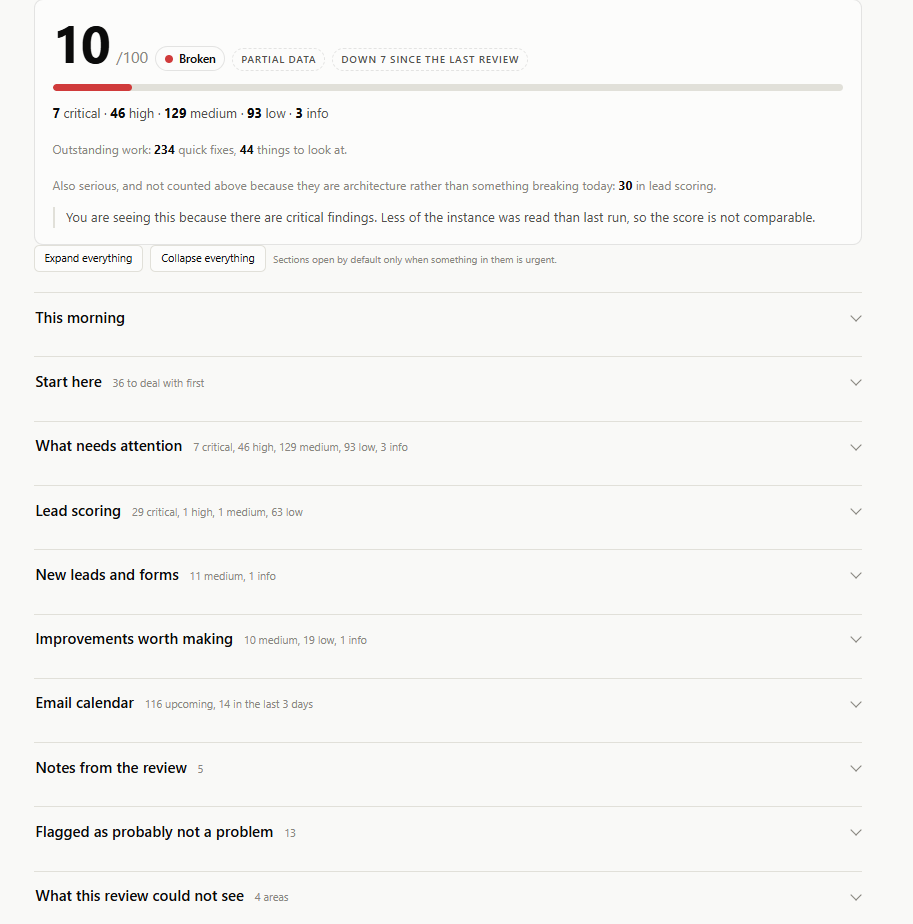
Reach out here to get a Marketo Health Check (the image below is an example of what this check could look like).
Happy Halloween from all of us at Revenue Pulse!